_ Mode
« previous post | next post »
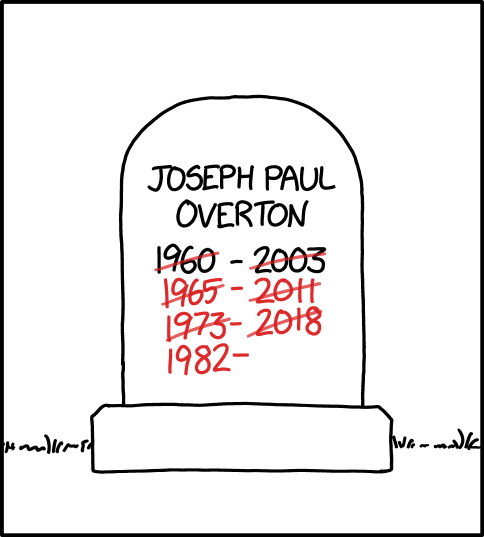
Mouseover title: "I think I accidentally installed an Overton window in my bedroom. A few months ago, the sun wasn't in my face in the morning, but now it is."
ICYMI: Wikipedia on "Overton Window".
More comically interesting: the menu of "Mode" choices now routinely displayed below the cartoon:

You should try them all!
languagehat said,
April 9, 2026 @ 8:11 am
Warning: "Darkest Mode" turns the screen black, and it's impossible (in my version of Firefox, anyway) to find the menu to change it — I just have to use the back button to get to the previous page. People report that you can still see the menu in slightly lighter black or something, but this isn't the case for me.
Andrew Taylor said,
April 9, 2026 @ 8:23 am
The "mode" dropdown first appeared in https://www.explainxkcd.com/wiki/index.php/3227:_Creation , published on April Fools' Day.
Daniel Barkalow said,
April 9, 2026 @ 9:50 am
I was disappointed that Greyscale Mode and Dorian Greyscale Mode weren't followed by Dorian Mode.
Charles in Toronto said,
April 9, 2026 @ 11:57 am
When you switch it from Grayscale Mode to Greyscale mode, "MATH" becomes "MATHS" in the page header.
David Marjanović said,
April 10, 2026 @ 8:51 am
It seems to me that lots of people keep their screen on maximum brightness. I think that's the point of all the dark modes, and the reason why there are e.g. YouTube videos that are just a black blur unless I max out my screen brightness. I guess you've tried that? I can't test it myself.
Andreas Johansson said,
April 11, 2026 @ 11:40 am
I often use dark mode at 20% screen brightness. But then I'm exceptionally light sensitive due to chronic migraine.
Yerushalmi said,
April 12, 2026 @ 5:29 am
Re: Darkest Mode, since the dropdown menu still has focus you can use the keyboard arrow keys to move up and down.